Edit registration details
Misspelling or double entries may occur during the registration phase. Collected information, such as phone number, may change in the course of the program. You can edit and check the details anytime during the program, following the instructions below.
Who can perform actions in this page?
CVA Manager and CVA Officer roles can perform actions in the Registrations page. Only CVA Manager can edit the payment fields Max. payments and Transfer value multiplier. By default, no standard role can change the FSP of a registration: contact our support team if you need to change it. Learn more about Roles & Permissions
Editing registrations details
- Enter the registration profile by clicking on the Reg. # hyperlink on the left side;

- Once in the profile overview, click on Personal information tab;

- Click on Edit information button on the top right and Search for the field to edit;
- Type in the new value directly in the field and click Save. The old value will be automatically overwritten;
- A pop-up Update information request to fill in the reason for this change;

- Add a reason, then Save.
When the details are fully reviewed and correct, you can then mark the profile as validated. Follow the instructions to validate a registration profile.
Reason for update
For auditing and accountability reasons, changes in the registration's profile cannot be performed without indicating a reason. All data changes are logged into 121 platform with the old value, new value, reasons for update and are linked to the user's email address performing the change. To enhance the audit trail, you can download the data changes report by clicking on Export and selecting Status & data changes. Only CVA Manager can use Export. You can also overview the changes in the Activity Log within the registration's profiles.
Viewing images
If your Kobo form collects images, for example a photo of an ID document, you can view them on the Personal information tab. Each image field shows Available or Not available.
- Click Show next to the image field. The image opens in a separate window;
- Use the buttons at the top right of the window to Rotate clockwise, Rotate counter-clockwise, Zoom in and Zoom out. Hover over a button to see its name;
- When you have zoomed in, drag the image to see another part of it;
- To move the window, drag it. You can also resize or maximize it;
- Click Hide to close the image.
You can open several images at the same time, for example to compare them.
Note
Images cannot be edited in the 121 Portal.
Viewing the activity log
The Activity log tab of a registration profile lists everything that happened to the registration, with the user who did it (Done by) and the Date and time.
- Enter the registration profile by clicking on the Reg. # hyperlink;
- Click on the Activity log tab;
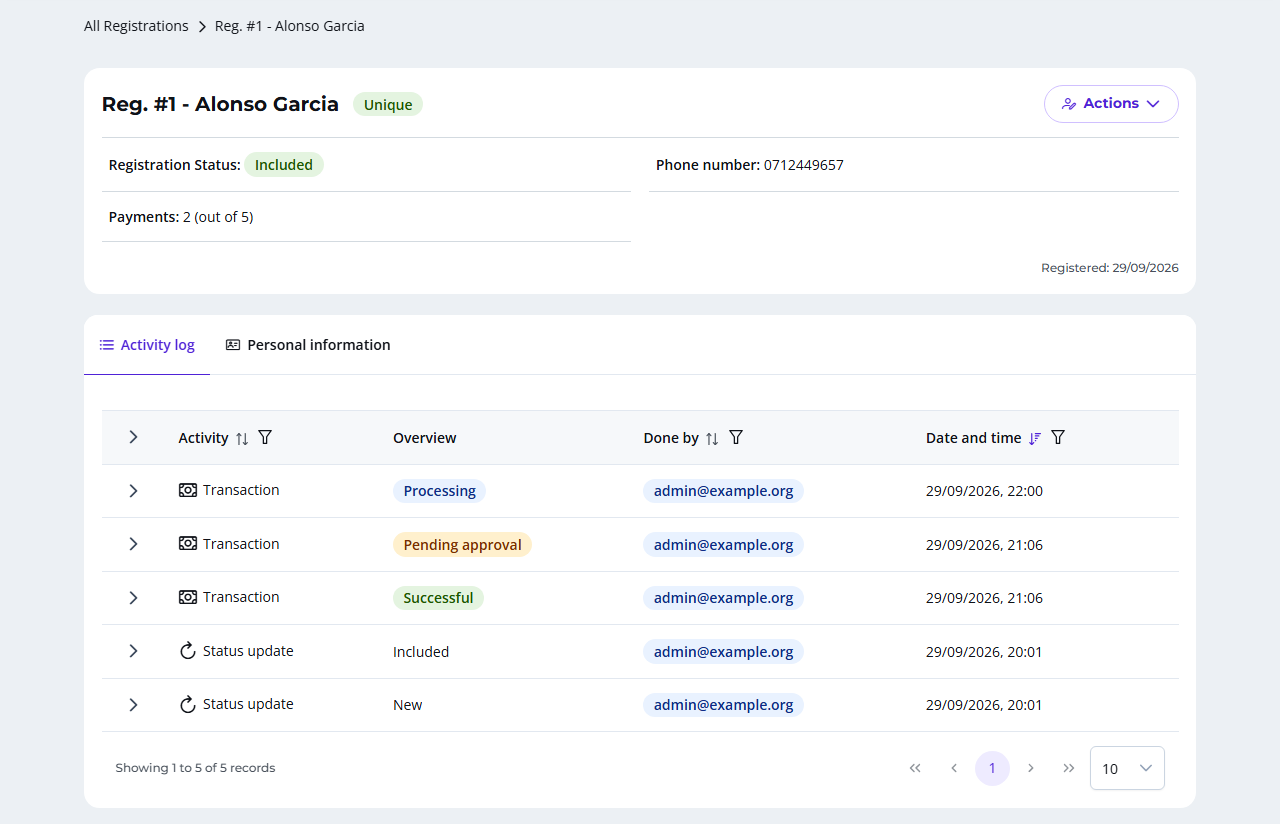
- To show only one type of activity, filter the Activity column;
- Expand a line to see its details.
The activity types are:
- Transaction: a payment to this registration. In the details, click View transaction history to see each step of the transaction, for example when it was created, approved and started, and any error messages;
- Message: an SMS or WhatsApp message linked to the registration;
- Note: a note added to the registration;
- Status update: the old and new status, and the reason for the change;
- Data change: the old and new value, and the reason for the change;
- FSP change: the old and new FSP, and the reason for the change;
- Duplication: a duplicate that was ignored. Click View registration to open the other registration.
Note
You only see the activity types that your role allows you to see.
Next steps? Include Registrations in a program
Follow the instructions to include registrations directly in the program
Need further assistance? Contact your dedicated Account Manager or reach our support team via email.