Add User to 121
Who can perform actions on this page?
Users with Organisational Admin rights can view and perform actions in this page. These rights are not linked to a role: the 121 support team turns them on for you. Learn more about Roles & Permissions
In the Users page, you can:
- See the list of all registered users in your 121 instance,
- Add new users into the 121 platform by sending them an invitation,
- Edit a user's name,
- Reset user's password.
On the left of your screen, open the menu and select Users. An overview of all users in the instance is shown with their latest login date.

Add User to 121
To grant login credentials and access to a new user on the 121 platform, you must add them as a 121 user.
- On the top right of the Users page, click Add new user,
- Enter the user's Full name and E-mail address,
- Click Add user.


An email will be automatically sent to the specified address. Ensure the email is correctly entered before sending the access link. The user will receive their credentials and a link to access the 121 platform through this email.
Add users to a program
Creating and adding a new user on the Users page grants them access to the 121 platform. However, this does not automatically assign them to any programs. As a result, they may see a blank page upon their first login unless they have already been added to a program.
Each user must be manually added to the specific programs they are assigned to. You can assign them a specific role within the program. Follow the instructions on this page to add team members to a program.
Edit a user
You can change the name of a user.
- At the end of the user row, click on the three dots,
- Select Edit,
- Change the Full name,
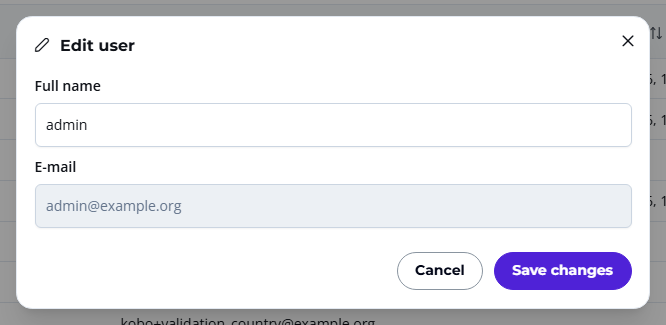
- Click Save changes.
Note
You cannot change the E-mail of a user. To copy a user's e-mail address, click on the three dots and select Copy email.
Reset User Password
You can reset a user's password directly from the user page.
- At the end of the user row, click on the three dots,
- Select Reset password,
- Confirm the action.

An email with a new password will be automatically sent to the user.
Need further assistance? Contact your dedicated Account Manager or reach our support team via email.